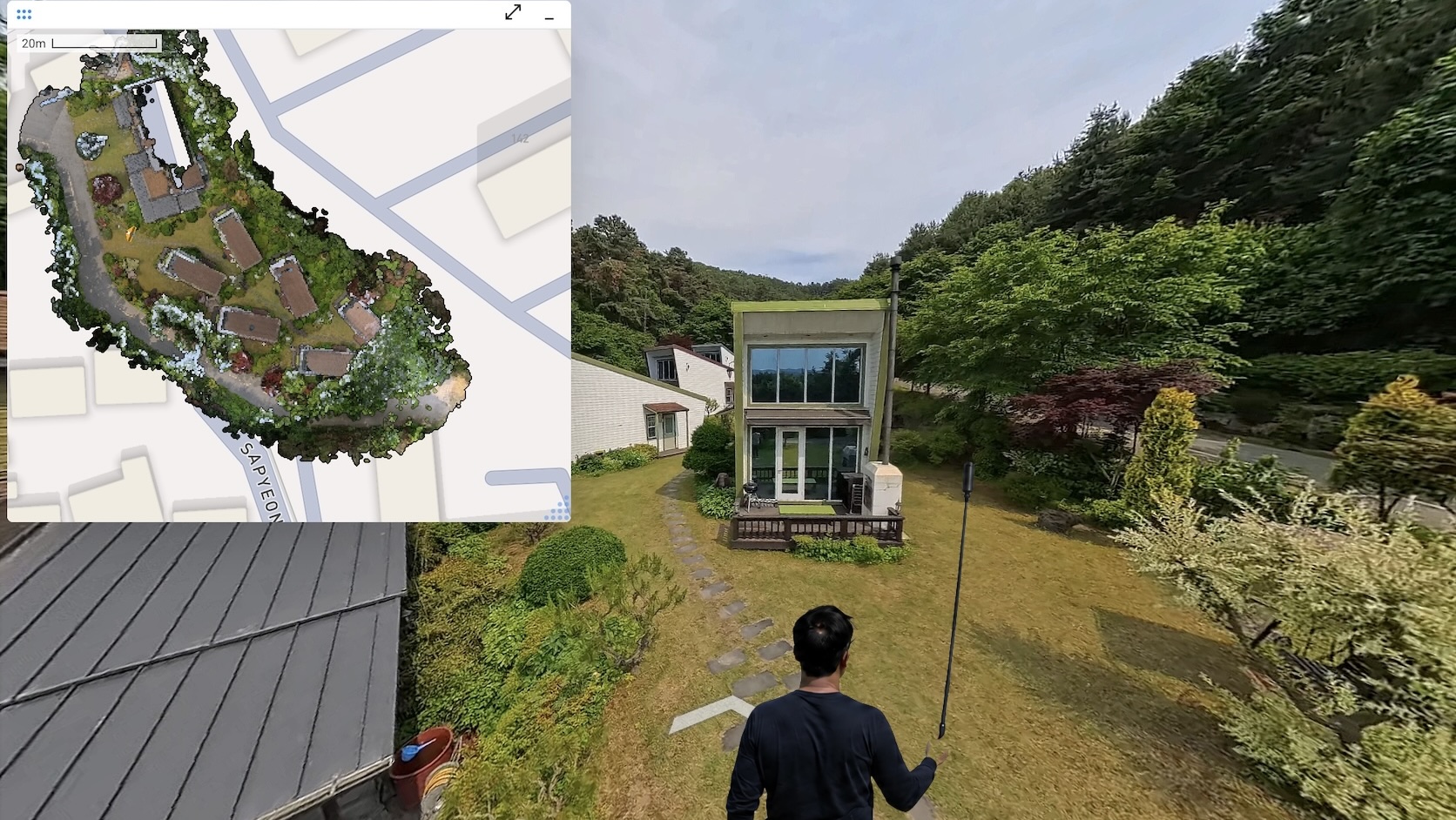
3D scanning has moved from specialist labs to everyday project work. The most common reason teams pick up a scanning tool today is an as-built site survey: capturing the real, current state of a space so the rest of the project can move forward. Architects running a pre-design site survey on a renovation. BIM coordinators preparing a scan to BIM handoff. Insurance adjusters documenting a loss. Facility managers updating a maintenance record.
The question is no longer whether to scan. It is which method delivers the right outputs in the time, team, and budget you have.
This guide reviews the three approaches most teams evaluate today: iPhone and iPad LiDAR apps, photogrammetry software (commercial and open source), and 360° video SLAM with CupixVista. Each has a place. The right choice depends on the size of the space, the accuracy you need, the people doing the capture, and the outputs your stakeholders actually want to open.
What an as-built site survey needs to deliver
A useful as-built site survey answers three practical questions:
- What is on site, dimensionally and visually, captured comprehensively in one visit?
- Can a non-specialist do the capture, and can stakeholders review and collaborate on it remotely?
- Do the outputs match what downstream teams use: a navigable 360° virtual tour for walkthroughs, a 3D map for spatial understanding, and exportable point clouds for design, BIM, and analysis?
Speed and accuracy matter. So does the form the data takes after capture. A point cloud no one outside engineering can open is not a site survey. It is a file. Here is how the three categories compare at a glance.
Method comparison at a glance
iPhone and iPad LiDAR apps
- Capture effort: Active aiming, slow sweeps, multiple short captures for larger spaces.
- Sensing range: ~5 m, narrow FOV.
- Output set: Point cloud, mesh.
- Best for: Small rooms, single pieces of equipment, short hallways, small-scale outdoor site surveys with RTK.
Photogrammetry (commercial and open source)
- Capture effort: High capture skill, lots of overlapping photos, slow processing.
- Sensing range: Camera dependent.
- Output set: Point cloud, mesh (no real-world scale without RTK or GCPs).
- Best for: Textured objects, monuments, well-lit drone surveys with ground control points.
360° video SLAM with CupixVista
- Capture effort: Passive walk with a 360° camera, single continuous take.
- Sensing range: Up to 10 m outdoors, ~5 m indoors, 360° FOV.
- Output set: Point cloud, mesh, navigable 360° virtual tour, 3D dollhouse map, geo-tagged detail photos.
- Best for: As-built site surveys, pre-design site surveys, scan to BIM, asset condition monitoring, forensic documentation.
The rest of this guide unpacks each row.
Option 1: iPhone and iPad LiDAR apps
A handful of iOS apps use the time-of-flight LiDAR sensor in Apple Pro-line devices, fused with ARKit’s visual-inertial tracking. Some apps process on-device. Others send data to the cloud for refinement, and a few pair with external RTK or GNSS receivers for survey-grade outdoor work.
Notable apps in this category:
- Polycam, cross-platform 3D capture with LiDAR, photo, and 360 panorama modes
- PIX4Dcatch, terrestrial scanning with optional RTK pairing for centimeter-grade outdoor accuracy
- Dot3D, pro-grade on-device reconstruction with AprilTag targets and direct point cloud export
- 3D Scanner App, popular general-purpose iOS LiDAR app from Laan Labs
- SiteScape, construction-focused LiDAR with inch-level building-scale accuracy
The strengths are real. LiDAR gives you real-world scale out of the box. SiteScape reports inch-level accuracy on building-scale indoor capture below 40 feet. PIX4Dcatch paired with RTK hardware can deliver centimeter-level absolute geolocation. For a small room, a piece of equipment, or a short hallway, an iPhone Pro and a low-cost subscription is a powerful tool.
The constraints are also real. Apple’s LiDAR has roughly a 5-meter reliable sensing range and a narrow field of view of about 61° by 48°. That forces active scanning. The operator has to point the device at every surface, rotate slowly through corners, and sweep ceilings deliberately. Anything taller than a single story, anywhere the operator cannot safely stand, and any space larger than a few thousand square feet starts to feel like work. A high atrium ceiling, a two-story facade, a warehouse interior, or a rooftop from ground level is out of reach for the sensor itself. Mounting the device on a long pole helps, but the narrow field of view still demands precise aiming.
Large spaces also break into many smaller scans that have to be aligned and stitched after the fact. Each stitch is another opportunity for drift, gaps, and visible seams in the final point cloud. A shopping mall, an office floor, a school, or a warehouse can easily turn into dozens of separate captures that an engineer then has to reconcile.
The output is also limited to point clouds and meshes. None of these apps deliver a true navigable 360° virtual tour, the kind of walkthrough non-technical stakeholders actually want to click through. And the workflow is locked to a specific phone tier: iPhone 12 Pro or later, or a 2020 or newer iPad Pro.
Option 2: Photogrammetry software (commercial and open source)
Photogrammetry reconstructs 3D geometry from overlapping 2D images using Structure-from-Motion and Multi-View Stereo. A DSLR or smartphone produces the input.
Commercial options, with pricing that ranges from free for organizations under one million dollars in annual revenue to per-seat subscriptions for professional licenses:
- RealityCapture, GPU-accelerated photogrammetry from Epic Games
- Agisoft Metashape, professional photogrammetry pipeline with detailed quality controls
- Pix4D, end-to-end photogrammetry suite for surveying and mapping
- 3DF Zephyr, photogrammetry suite with multiple tier offerings, including a limited free edition
Open-source options, free to license but requiring an Nvidia CUDA GPU and real technical expertise to drive:
- COLMAP, research-grade Structure-from-Motion and Multi-View Stereo pipeline
- AliceVision Meshroom, node-graph photogrammetry with strong texturing
- OpenDroneMap, aerial dataset processor with orthomosaic and DEM outputs
When the inputs are right, photogrammetry produces stunning results. Visual quality on textured surfaces is excellent. Drone photogrammetry matches LiDAR for flat terrain with good texture. For a single textured object, a small monument, or a well-lit drone survey with ground control points, photogrammetry is hard to beat.
When the inputs are wrong, photogrammetry fails quietly. Smooth painted walls, plain white plaster ceilings, glass, mirrors, and bare metal sheets starve the algorithm of the visual features it needs to match. Moving objects, including people, vehicles, and vegetation in the wind, break the core assumption that the scene is static. Reflections on water and glass confuse the reconstruction. Image overlap below 70% to 80%, motion blur, or bright-to-dark lighting changes can crash alignment.
Processing time is the other practical wall. Photogrammetry reconstructions on building-scale captures routinely take hours to a full day or more on a powerful workstation, depending on image count and GPU. For a team that needs the as-built record same-day or next-day, that lag is a non-starter.
Two other gaps matter for a site survey. First, photogrammetry has no real-world scale without RTK, GNSS, or ground control points. Second, photogrammetry tools produce a mesh or point cloud, not a navigable 360° virtual tour. They do not include hosting, secure project sharing, annotation, or measurement collaboration. That is fine for a tech-savvy engineer or researcher. It is friction for a project team that wants stakeholders to open a link, walk the site virtually, and leave comments anchored to the right spot.
Option 3: 360° video SLAM with CupixVista
CupixVista starts from a different premise. Instead of a narrow-FOV sensor that has to be aimed, it uses a consumer-grade 360° camera that records everything around the operator at once. A SLAM engine turns the video into a 3D point cloud, a textured mesh, an immersive 360° virtual tour, and a dollhouse-view 3D map. The shift from active aiming to passive 360° capture changes what an as-built site survey feels like and what it can cover.
Passive 360° capture, no aiming required
The operator walks. The camera does the rest. Every pixel in every direction is recorded, so corners, ceilings, and rear walls are captured in the same pass as the floor in front of you. There is no scanning expertise required. Architects, engineers, surveyors, landscape architects, superintendents, adjusters, and inspectors all capture in the same way: pick up the camera, walk through the space, stop the video.
Sensing range up to 10 meters outdoors
CupixVista’s per-pixel depth recovery reaches up to 10 meters outdoors, double the ~5-meter ceiling of iPhone LiDAR. Indoors it sits at about 5 meters, on par with iPhone LiDAR, but the 360° field of view changes what is reachable. Because the operator does not need to aim the camera, mounting it on a 10-foot pole like the Insta360 Extended Edition Selfie Stick is straightforward. High-bay warehouses, two- and three-story facades, rooftops, dangerous terrain, and double-height hospital lobbies all become routine captures. A 20-minute walk can cover up to 60,000 square feet, and CupixVista delivers up to 99% schematic dimensional accuracy on the resulting 3D map.
Combined with passive 360° capture, the longer range means large sites get captured in a single continuous take instead of dozens of small LiDAR scans that need to be aligned later. One walk, one upload, one record. No stitching, no seam reconciliation, no drift between segments.
Real-world scale and geolocation without dedicated RTK hardware
CupixVista fuses video frames, the camera’s IMU (Inertial Measurement Unit) data, and the phone’s GPS. Outdoor segments are auto-detected to filter for reliable GNSS, so projects are geo-referenced without a separate receiver. Scale is recovered from the IMU signal, not from a manual ground-control workflow. Because the GPS comes from the phone, the system works with any supported 360° camera, including:
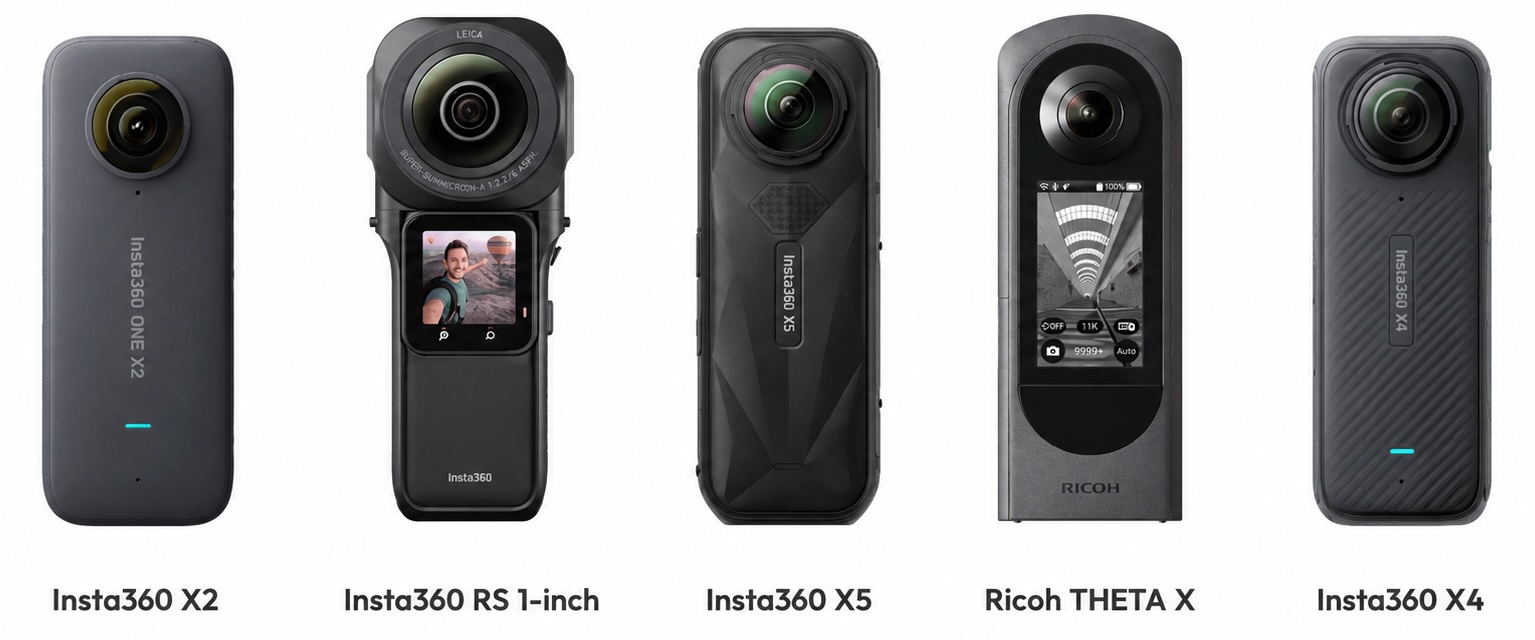
- Insta360 X5
- Insta360 X4
- Insta360 ONE X2
- Insta360 ONE RS 1-Inch 360 Edition
- Ricoh Theta X
OmniNote captures the details a 360° lens cannot resolve
A 360° camera spreads its resolution across a full sphere. Even at 6K, the per-degree pixel count is lower than a phone camera pointed at a single object. OmniNote closes that gap. During the same 360° walk, the operator takes high-resolution photos and voice notes with their phone, and CupixVista geo-tags every one of them to the right point in the 3D model. Voice notes auto-transcribe to searchable text. AI text recognition reads equipment nameplates, safety signs, serial numbers, and handwritten markups.
Built on millions of 360° videos already processed
Cupix has been processing 360° video at production scale for years across both CupixVista and the enterprise platform CupixWorks. Tens of thousands of professionals have run millions of 360° videos through the Cupix pipeline. That track record shows up in the parts of capture that most often go wrong on a real job site.
The pipeline handles inputs that defeat less mature SLAM engines:
- Tight spaces with limited line of sight, like narrow hallways and mechanical rooms
- Drastic lighting changes between bright daylight and dim interiors
- Severe motion blur
- Dropped image frames
- Rapid camera height changes, including putting the camera on and off the pole
- IMU sensor errors, including bias drift and collision shocks
A preprocessing step also filters out moving objects, people, vehicles, vegetation, sky, and clouds, before tracking, so the SLAM engine works only on stable scene geometry. High-quality meshing and texture mapping finish the visual side. The result is a 3D map and a 360° virtual tour that hold together on real construction sites, not just clean reference scenes.
A complete output set and a workspace for every stakeholder
iPhone LiDAR apps and photogrammetry software deliver point clouds and meshes. The full as-built output set that stakeholders actually use, a navigable 360° virtual tour, a 3D dollhouse map, geo-tagged detail photos, and a measurable point cloud, has historically only come from professional, high-dollar systems like Matterport or NavVis. CupixVista delivers that same output set from a consumer 360° camera, so the documentation reaches owners, designers, contractors, subcontractors, adjusters, and field crews in the form each role prefers.
The project lives in a shared workspace, not on a hard drive. Stakeholders log in to:
- Walk the 360° virtual tour
- View the 3D dollhouse
- Measure distances, areas, and volumes
- Run an elevation heatmap
- Drop annotations with file attachments
- Load shareable team bookmarks at exact 3D viewpoints
- Manage secure access controls per project
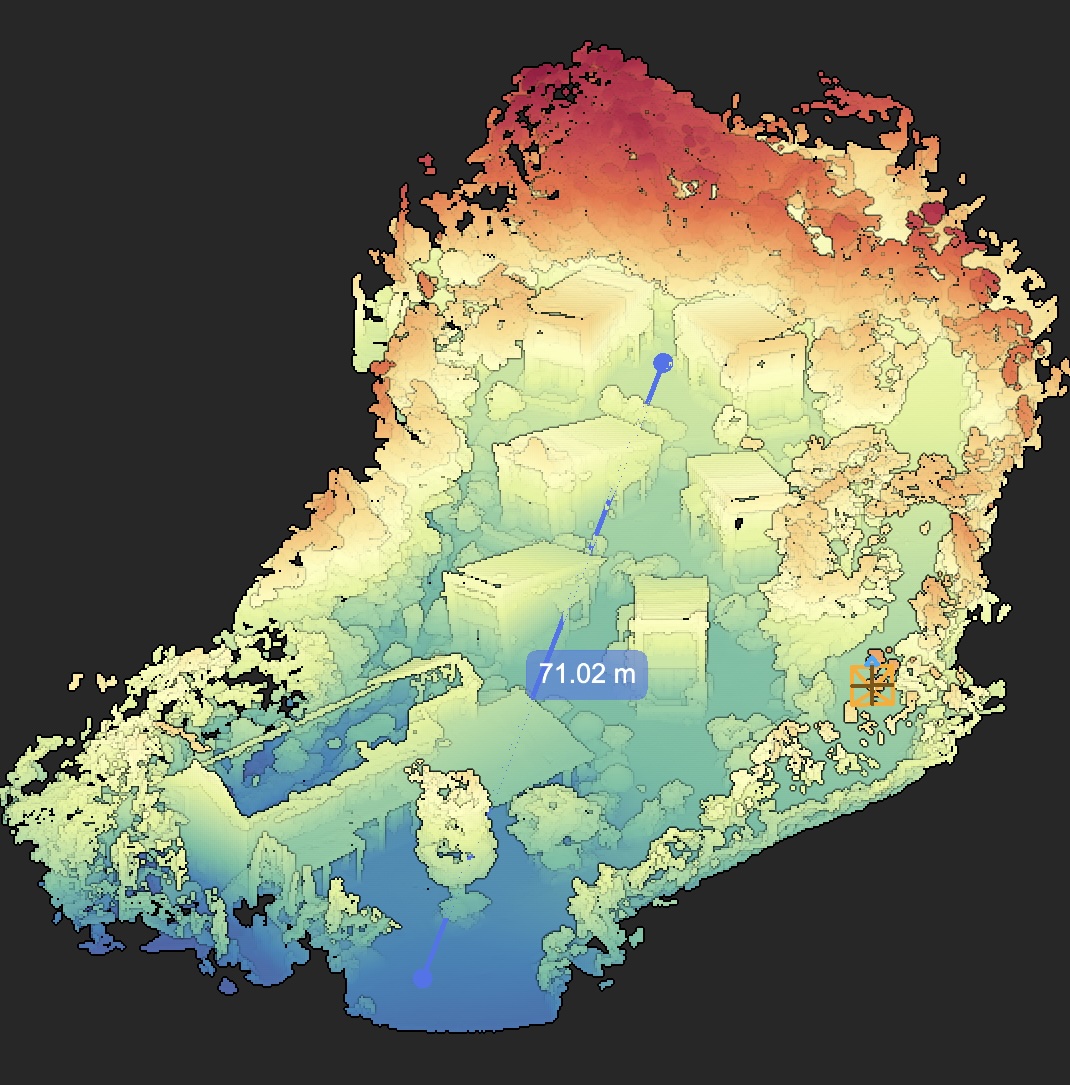
Exports go out in PLY, XYZ, and E57 for downstream tools. A one-click Autodesk Revit plugin imports the point cloud directly into Revit for teams running a scan to BIM workflow, and Cupix service partners can deliver finished BIM assets if you prefer to outsource the modeling.
What this looks like as a real workflow
For an as-built site survey or a pre-design site survey, the loop is short:
- Walk the site with a supported 360° camera. Capture detail photos and voice notes through OmniNote.
- Upload through the VistaCapture app. AI processing typically completes in two to three hours.
- Open the project in VistaPoint or in the browser. Measure, annotate, walk the 360° virtual tour, view the 3D dollhouse, run an elevation heatmap.
- Invite remote stakeholders to review the same record from anywhere. Customers report up to 83% travel-cost reduction and 24x faster site analysis compared to photos and notes.
- Export to a point cloud, pull the data into Revit through the plugin, or hand the project to a scan to BIM partner for a finished model.
For a single piece of equipment, an iPhone LiDAR scan is still the right call. For a textured monument or a drone-flown facade with ground control points, photogrammetry still produces beautiful work. For any as-built or pre-design site survey where coverage, range, stakeholder collaboration, and a complete output set all matter, the 360° video SLAM path is the practical one.
CupixWorks: the enterprise companion to CupixVista
CupixVista handles the capture and review loop for individual projects. For organizations running portfolios, CupixWorks extends the same 360° video SLAM engine into a fully managed enterprise platform. CupixWorks aggregates 360° captures, laser scans, drone imagery, and GIS layers into a single source of truth, integrates with BIM to compare job-site progress against design intent, and maintains a defensible spatial record across the asset lifecycle. It is the platform layer where Cupix detects meaningful issues early, aligns design intent with site reality, and protects teams with a record that holds up months or years later. The two products share the same processing core, so a project that starts as a CupixVista capture can graduate to CupixWorks without re-scanning.
A fast, accessible way to a complete as-built record
The right 3D scanning method for an as-built site survey is the one that lets a non-specialist capture everything in one walk, produces the outputs your team and your clients actually use, and runs on equipment your organization can afford. CupixVista is that method for the cases that matter most: site surveys, pre-design site surveys, scan to BIM handoffs, asset condition monitoring, and forensic documentation. A consumer-grade 360° camera, a video walk, and a few hours of AI processing produce the 360° virtual tour, the 3D dollhouse map, the measurable point cloud, and the geo-tagged detail photos that stakeholders open on day one and reference for years.
Ready to see it work? Get started with CupixVista, or browse answers to common questions.